NS Basic/App Studio 1.3.0 Released!

NS Basic/App Studio 1.3.0 is ready to download. You can download it from the same URL as before. We will also be sending an email with the address to registered users.

Major new features include:

– PhoneGap Build integrated into IDE
– New Adsense control: make money from ads in your app
– New NSB.MsgBox control: nicer looking, more features
– iOS 5 features: Date, DateTime, Month and Time pickers

As well as lots of other additions and bug fixes!

Here is the complete list:

1.3.0

  1. PhoneGap: Can now create native apps directly in NS Basic/App Studio.
  2. Controls: New AdSense control lets you add advertising to your app.
  3. Language: New NSB.InputBox function
  4. Language: New NSB.MsgBox function
  5. Controls: ComboBox: Complete overhaul, much easier to use. See below.
  6. Controls: Add new Date, DateTime, Month and Time input types for iOS5.
  7. Code Window: ‘is’ and ‘in’ are now treated as a keywords.
  8. Code Window: Search now handles unicode characters.
  9. Code Window: Fixed bug on line continations.
  10. Controls: Menus now refresh automatically when items added or deleted.
  11. Controls: Menus: Scrolling fixed on MenuNumber* controls.
  12. Controls: Menus: several formatting problems fixed.
  13. Deploy: NETWORK: * is default in manifest. See below.
  14. Docs: Handbook and Language Reference updated.
  15. IDE: Amazon Fire screen size added. (see below)
  16. IDE: File name at top of the screen corrected.
  17. Language: New Sort() function – see sample in Folder 3.
  18. Language: Values of vbYes and vbNo changed from true, false to 6,7.
  19. Language: MsgBox returns new values for vbYes and vbNo.
  20. Language: Add encodeURI() and decodeURI() to documentation
  21. Language: Add encodeURLComponent() and decodeURIComponent() to docs.
  22. Runtime: iScroll updated to 4.1.9
  23. Samples: New DateTime sample.
  24. Samples: New Sort sample.
  25. Samples: All web samples have improved manifests.
  26. Samples: FaceBookAPI and GoogleReverseGeocoding should now work.
  27. Samples: Geolocation updated due to change on Google’s server.
  28. Samples: New AdSense sample.
  29. Samples: New nsbMsgBox sample shows MsgBox and InputPrompt.
  30. Samples: LocalStorage enhanced with extreme comments. (Thanks, Alan Heverly!)


Documentation Changes for Version 1.3.0

  1. iOS5: This release brings support for new features in iOS5. Unfortunately, iOS5 has a bug which affects all web apps (not just NS Basic generated ones). It is recorded as Bug 9519157 in Apple’s tracking system. The first time an app is run after it is saved to the Home screen, it will show a message that internet access is required. The message can be ignored: it will only appear once.

  2. PhoneGap Build in NS Basic/App Studio: We have now added the ability to create native apps using PhoneGap directly into NS Basic/App Studio. Here is what you need to do:

    1. If you have a PhoneGap Email and Password, enter it into Deploy Options (under the Tools menu). Otherwise, a demo account will be used.
    2. From the Run menu, choose “Build Native App”.
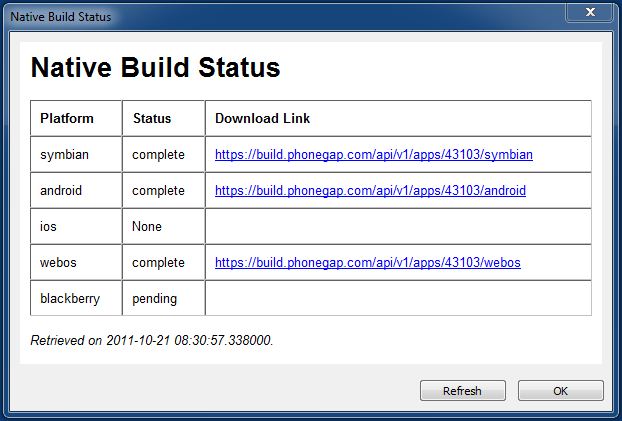
    3. From the Run menu, check the status of your build in “Get Native Build Status”.
    4. As the builds complete, the URLs to download them will appear on this screen.
    5. Do whatever else you need to do to deploy the native app to the device.
    6. To set additional options for the build, create a config.xml file in your home directory. See https://build.phonegap.com/docs/config-xml.

  3. ComboBox: Now much easier to use, and supports setting up the list in the IDE. Old implmentation should continue to work. See updated sample.

  4. Manifest: NETWORK: * is now part of the default manifest. This means that any external reference is now allowed. This is especially helpful if you are doing complex operations with external servers. If you add your own NETWORK: section to your manifest, it will override the default setting.

  5. New AdSense Control: AdSense lets you put advertising on your page. If your customer clicks on it, your AdSense account at Google will earn money. To use this, first sign up with AdSense.com, then fill the account details into the control’s properties. Note that if the customer clicks on an ad, your program will end and the customer will be taken to the ad’s website. Make sure you keep your current state saved so you can restart.

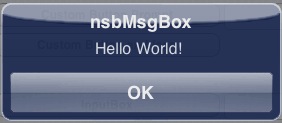
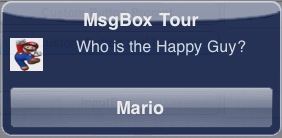
  6. New NSB.MsgBox control: The current MsgBox statement reads “JavaScript” instead of the program name, and is missing many features found in the VBScript version. The new NSB.MsgBox remedies this – it has all the features of the VBScript statement and more: such as custom icons.

    There is one significant difference. All execution is not stopped until the user responds (as the current MsgBox and the VBScript one do). The screen will lock out all other input, but execution will continue. Once the user has dismissed the NSB.MsgBox, a function in the program can be called to deal with the result.

    See the new nsbMsgBox sample.

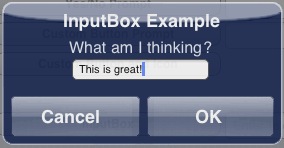
  7. New NSB.InputBox control: Implemented much like NSB.MsgBox.

  8. Amazon Fire support: While we support the screensize of the device, we have not actually gotten one to test yet. No promises until we do!

NS Basic/App Studio 1.2.6 Released!

NS Basic/App Studio 1.2.6 is ready to download. You can download it from the same URL as before. We will also be sending an email with the address to registered users.

1.2.6

  1. Samples: Nearly all have been revised and new comments added.
  2. Controls: All scrolling controls now have a refresh() method. See below.
  3. Docs: Handbook and Language Reference updated.
  4. Code Window: ‘Not’, ‘True’ and ‘False’ were not colored correctly.
  5. Code Window: False syntax error on Do statement fixed.
  6. Controls: Form now has some events.
  7. Controls: nsbbutton class improved.
  8. Controls: Remove href=”#” tags – fixes refresh problem.
  9. Deploy: Incorrect browser message can be changed.
  10. Language: New global: Location. See Language Reference.
  11. Samples: New Picturebox_ScrollAndZoom sample.
  12. Samples: Reorganized folders.


Documentation Changes for Version 1.2.6

  1. Scrolling controls: All now have a .refresh() method, which replaces having to do SetTimeout(control_ref.refresh(),100). Now you just need to do control.refresh() after the content of a scrolling area is rendered or updated.

NS Basic/App Studio 1.2.5 Released!

NS Basic/App Studio 1.2.5 is ready to download. You can download it from the same URL as before. We will also be sending an email with the address to registered users.

There are a few nice new features:
– New samples for TextToSpeech, Encryption and Sencha Touch.
– New ButtonBar and PayPal controls
– Deployment improved
– Lots of fixes and usability improvements

1.2.5

  1. Samples: TextToSpeech sample added.
  2. Samples: New Encrypt sample added.
  3. Controls: new PayPal button control to “Buy Now” or “Donate”.
  4. Controls: new ButtonBar control.
  5. Design Screen: Right click to add control.
  6. Samples: new SenchaKitchenSink (work in progress)
  7. Code Window: improve syntax error checking for HTML blocks.
  8. Code Window: Fix line continuation problem with syntax checking.
  9. Code Window: Fix problem with block comment selection.
  10. Code Window: Fixed generated event functions in JavaScript mode.
  11. Controls: Grid has new refresh() function.
  12. Controls: iMenu.addItem now adds images properly. (Thanks, Brian Leach!)
  13. Controls: Audio and Video no longer have extra / in tag.
  14. Deploy: Improvements for IIS servers.
  15. Deploy: Improvements to server folder creation.
  16. Deploy: Streamline some HTML in the header.
  17. Deploy: Manifest file now called index.manifest for PhoneGap.
  18. Docs: Handbook and Language Reference updated.
  19. Language: GetRef() function added. See Language Reference.
  20. Samples: fixes to Base64Image, Signature, SqlSample1
  21. Samples: Reorganized folder.
  22. Sencha: Added Overlay() function. See SenchaKitchenSink sample
  23. Translater: Functions with “_” in their name fixed.
  24. Translator: x = {b: {d: a, e: a}, c: a} fixed.
  25. Translator: If a.b=true then… no longer changes value of a.b.
  26. Translator: If If a then MsgBox “b” fixed.


Documentation Changes for Version 1.2.5

  1. New PayPal control: This provides an easy way to collect a payment or a donation from a user. Tapping on it will bring up the PayPay Payments screen with the user and amount filled in – all they have to do is approve the transation. To use it, you need to have a PayPal Merchant Account (easy to set up), and use Merchant Services to create a button. Use the ID number it gives you in the properties of the button, and specify whether this is a Donation or Purchase. This feature will be handy for those selling commercial or donationware apps.

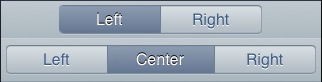
  2. New ButtonBar control: This control lets you arrange two or three buttons, either as a titlebar or lower down on the form. This are usually used for apps with multiple forms to switch between. Each form will have a buttonbar control on it, with a different button highlighted.

  3. Text to Speech: A new sample has been added showing how to get the device to speak a text string. To do this, you will need to sign up with iSpeech. The first 1000 words are free.

  4. Sencha Touch is an additional library of controls and functions. The best way to experience it is to run the new KitchenSink sample in the Sencha folder. It has some beautiful effects (more coming), but since it is fairly large, it can slow down app deployment and loading.

  5. Grid.refresh(): This new function should be called whenever the size of a grid changes, or when a scrolling grid is opened on a new form. It replaces the SetTimeout(grid_ref.refresh(),100) that used to be needed. Check the GridWithScrolling sample to see how it is used.

  6. Design Screen: When you right click on the Design Screen, there is an option to “Add Component”. This brings up a list of all the controls: you can pick which one you want to add to the form. This is especially useful for people whose screen is too small to display the complete ToolBar. You can even turn the Toolbar off under the View menu if you are no longer using it.

PhoneGap 1.0 released!

PhoneGap has announced that Version 1.0 is now available. The release puts the focus on accessing native device APIs, which is new ground for the web. Other improvements include:
* Overall API stability and “pluggable” architecture
* W3C DAP API compatibility
* Contacts API
* Remote debugging tools
Today’s release also includes a new unifying bridge interface that makes adding platforms and platform extensions easy. Plus, developers will be pleased to see that the plugin development process has been simplified.

PhoneGap lets NS Basic/App Studio users package their apps for iOS, Android and other app stores. It also gives them additional API functions.

The easiest way to make use of PhoneGap is with PhoneGap Build. There is also a tutorial on using PhoneGap Build.

Here are some other NS Basic + PhoneGap resources:

NS Basic/App Studio 1.2.4 Released!

NS Basic/App Studio 1.2.4 is ready to download. You can download it from the same URL as before. We will also be sending an email with the address to registered users.

There are a few nice new features:
– Lots of right click features in the Design Screen
– JSON support for data interchange
– Faster deploying
– Lots of fixes and usability improvements

1.2.4

  1. JSON support added. See docs below.
  2. Design Screen: Right click on a control brings up lots of options.
  3. Properties Window: Now remembers folder settings on restart.
  4. Controls: Button is now square with rounded corners. See docs below.
  5. Deploy: Faster, since only files actually used are deployed.
  6. Code Window: Sleep 5000 no longer hangs IDE for 5 seconds.
  7. Code Window: Problem with indenting fixed.
  8. Code Window: Resume is no longer highlight.
  9. Controls: HTMLview now scrolls properly.
  10. Deploy: 550 error on some servers fixed.
  11. Deploy: If serial number is removed, deploy still works.
  12. Demo Screen: PayPal button added.
  13. Design Screen: Fix problem with pasting multiple copies of a control.
  14. Design Screen: Right click on a control brings up options.
  15. Docs: Handbook and Language Reference updated.
  16. IDE: Improved demo screen.
  17. IDE: Deploy password now encrypted.
  18. Language: DIM array can now have any number of dimensions. (Thanks to Thomas Gruber!)
  19. Language: New functions – JSON.stringify(), JSON.parse().
  20. Language: New statement: Sleep
  21. Runtime: Added BlackBerry to supported device browsers.
  22. Samples: SQLSample1 now uses JSON to output SQLite database.
  23. Samples: MiniDataServer is an alternative to WebSockets. (Thanks to Robert Borsuk!)
  24. Samples: New GoogleReverseGeocoding sample.
  25. Samples: ReadFile uses updated HTMLview.
  26. Translator: ‘f = FactCalc()’ was not always translating properly.
  27. Translator: ‘Function test(p) one’ no longer hangs IDE.
  28. Translator: Dim(10,10,10) was not creating all elements.
  29. Translator: Typename(“12345a”) returned Integer, not string.
  30. Translator: Dim(a.b) is now allowed.


Documentation Changes for Version 1.2.4

  1. Make sure you do a full deploy the first time you run the new version.

  2. JSON is now supported. JSON is a standardized way of converting objects to strings so they can easily be saved or transmitted to other systems. For example, you could convert an SQLite database to JSON, then transfer it to a server using WebSockets or HTTP POST. The server would then unpack it and process it.

  3. Buttons now look more like standard iOS buttons. The edges are now straight: just the corners are rounded. Any new buttons you create will have the new look: to upgrade old buttons to the new look, enter nsbbutton into the class property of the button in the IDE. To keep the old appearance, leave the class property blank. Be sure to do a full deploy to see this change.

NS Basic/App Studio 1.2.3 released!

NS Basic/App Studio 1.2.3 is ready to download. You can download it from the same URL as before. We will also be sending an email with the address to registered users.

There are a few nice new features:
– New List controls
– jQuery sample
– Scrolling enabled for more controls
– Lots of fixes and usability improvements

1.2.3

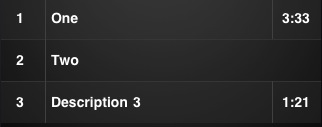
  1. Controls: New MenuNumberTitleDescArrow (see docs below)
  2. Controls: New MenuNumberTitleTime (see docs below)
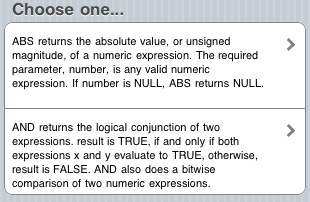
  3. Controls: New MenuTextBlock (see docs below)
  4. Samples: New jQuery sample.
  5. Samples: New BarCode reading sample.
  6. Code Window: Shortcuts: Ctrl F for Find, Ctrl G for Find Next.
  7. Code Window: Multi line statements are syntax checked correctly.
  8. Controls: Grid scrolling improved.
  9. Controls: MultiInput and Menu now support scrolling.
  10. Docs: Handbook and Language Reference updated.
  11. Deploy: Extra MKD operations removed: deploy speed improved.
  12. Deploy: Improvements to error messages.
  13. Language: New bitwise functions: ANDb, ORb, XORb, NOTb. See Language Reference.
  14. Project Explorer: right click to move and delete controls.
  15. Project Explorer: Problem with deleting all forms fixed.
  16. Properties Window: Return no longer needed to save changed value.
  17. Runtime: “UpdateReady” cache message now reads “Update Complete – Restarting”
  18. Runtime: Global code is executed before first form shows.
  19. Runtime: iScroll.js updated to 4.1.2
  20. Runtime: Removed some unneeded image files.
  21. Samples: Communicating: Add Skype calling as an option, refresh screen.
  22. Samples: New BarCode reading sample.
  23. Samples: New GridWithScrolling sample.
  24. Samples: New MenuNumberTitleDescArrow, MenuNumberTitleTime, MenuTextBlock samples.
  25. Toolbox: Controls are now in alphabetic order
  26. Translator: Replace(s,”)”,””) fixed.
  27. Translator: a=Log(1) fixed.
  28. Translator: a=5.1 mod 3.1 fixed.
  29. Translator: a=[{b:1}] fixed.
  30. Translator: t[1,(1) Mod 2] fixed.


Documentation Changes for Version 1.2.3

  1. MenuNumberTitleDescArrow: This new control shows a number (or word), title, optional description and an arrow. See Language Reference for more details.

  2. MenuNumberTitleTime: This new control shows a number (or word), title and optional time. See Language Reference for more details.

  3. MenuTextBlock: This new control shows blocks of text and an arrow. Useful as a preview of text. See Language Reference for more details.

NS Basic/App Studio 1.2.2 released!

NS Basic/App Studio 1.2.2 is ready to download. You can download it from the same URL as before.

There are a few nice new features:
– Syntax checking as you enter your code.
– Grids and Picturebox controls can scroll.
– New samples for Facebook and Sencha Touch.

Here is the complete list:

  1. Code Window: Syntax checking added.
  2. Controls: Grid can scroll.
  3. Controls: PictureBox can scroll.
  4. Samples: New FacebookAPI sample.
  5. Samples: New Sencha Touch sample.
  6. Code Window: Turn off undo when setting initial text.
  7. Controls: Grid new row height is now correct.
  8. Controls: Button had invalid default property.
  9. Deploy: Error message if remote server cannot be found.
  10. Deploy: Error message shows if login info is not correct.
  11. Deploy: Error message shows if remote folder cannot be created.
  12. Deploy: Progress message improved.
  13. Deploy: Thumbs.db file ignored if in upload folder.
  14. IDE: Bug when closing minimized IDE fixed.
  15. IDE: iPhone 4 Design Screen size corrected.
  16. IDE: Problem with positioning bottom of object above top fixed.
  17. IDE: Problem with save fixed.
  18. Language: For Each index, item in Data now supported.
  19. Language: ReadFile produces better error messages.
  20. Samples: GetData sample improved.
  21. Samples: HTMLview – added display a .htm file in HTMLview control.
  22. Samples: ReadFile sample improved.
  23. Samples: WebSocket sample improved.
  24. Translator: Execute() function now works.
  25. Translator: Exit Function now returns value.
  26. Translator: If e.keyCode = 13 Then Button1_onclick() fixed


Documentation Changes for Version 1.2.2

  1. The first time you compile under this release, it will take a bit longer. Afterwards, it will be as usual.
  2. Do a full deploy the first time you run on the new release.

Programming Contest Results

The results of the first NS Basic/App Studio Programming Contest are in. The winners are:

Business: RMRFuel – RMR Software

This is a very real, very usable app. It should really be considered together with its 3 siblings. In fact, the author plans to create an integrated app. Since the entry was submitted, improbements have been made to the user interface. You can try the beta of the improved banking module at http://www.rmrsoft.com/RMRBank1.

Fun: Color/Shape — mizuno-ami/JAPAN

Simple, but nicely laid out. It works just like the successful Palm OS version. It has the potential for much improvement, using the user interface possibilities of the platform.

Congratulations to both the winners and other entrants. It was tough to pick the single best app!

See the full results here:
http://www.nsbasic.com/app/contest/

Update: mizuno-ami has requested his reward be sent to the Japanese Red Cross for their disaster relief efforts in Japan. 14,575 persons died, and 11,324 persons are missing now. We have matched his donation and encourage others to paypal contributions to https://gienkin.jrc.or.jp/paypal

NS Basic/App Studio Handbooks are here!

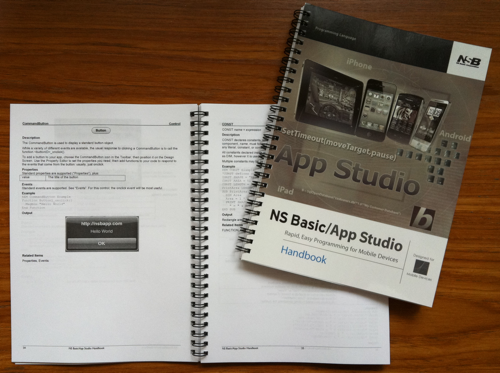
The NS Basic/App Studio Handbooks have just arrived. They are about 125 pages and spiral bound so they lie flat on your desk. PDF’s are handy, but hardcopy is always nice. It does not take up any space on your screen, and it’s easy to write your own notes on the pages.

Just $24.95 USD, plus shipping of $6.50. We ship by regular mail to North America, Air Mail to the rest of the world. Delivery is usually within 2 weeks.


handbook

NS Basic/App Studio 1.2.1 released!

NS Basic/App Studio 1.2.1 is ready to download. You can download it from the same URL as before. There is also a new, faster download location: we will be emailing that to everyone.

There are a few nice new features:
– You can now upload a whole folder of files with your app.
– A number of controls have new properties to enhance their appearance.
– iPads can now have splashscreens

Here is the complete list:

  1. Deploy: Directory names can be put in the manifest.
  2. Controls: FontSize, FontFamily, FontStyle, FontWeight, color and backgroundColor properties added to Label, Text, TextArea and Button.
  3. Controls: FontSize, FontFamily, FontStyle, FontWeight and color properties added to HTMLview.
  4. Controls: Hidden property added to a number of controls.
  5. Controls: HTMLview border-style changed to borderStyle, and background-color changed to backgroundColor.
  6. Deploy: Cache Manifest simplified.
  7. Deploy: All system files are now put into a new nsb folder.
  8. Deploy: slash and colon now allowed in manifest file names.
  9. Deploy: Apps deployed to nsbapp are now available immediately.
  10. Deploy: Apps now stay on nsbapp.com for 10 days.
  11. Deploy: Progress message appears properly with lots of files.
  12. Docs: Handbook and Language Reference updated.
  13. IDE: Adding code file marks project as dirty for saving.
  14. IDE: Problems in Recent Files list fixed.
  15. IDE: New splashscreenipad property.
  16. Setup: Menu shortcut no longer contains version number. You may need to uninstall/reinstall to see this change.
  17. Project Explorer: multiple code files fixed.
  18. Runtime: Browser check fixed for IE.
  19. Samples: Base64Image added – shows using image as a string.
  20. Samples: HTMLviewCallFunction – call a function in your app from HTMLview.
  21. Samples: iMenu and iTitlebar renamed Menu and Titlebar.
  22. Samples: MoveTheBall renamed to Accelerometer.
  23. Translator: Dim tt(6):s=tt(1-1) fixed.
  24. Translator: if s=”if(” then s=s & “}” fixed.
  25. Translator: if s=”if(” then s=s & “” fixed.
  26. Translator: d = new Date() fixed.


Documentation Changes for Version 1.2.1

  1. Deploy: We have made some changes to how files are deployed to provide some additional functionality. You can now put the name of folder in your list of files to deploy. That folder, and all of the files and folders in it, will be copied to your server. This makes it easy to have a project with a lot of files: you no longer have to list each file in the manifest.

    We also reorganized the files that NS Basic needs at runtime, putting them all into an /nsb/ folder within your project. You may want to delete your app from your server completely before you deploy next time: that will get the obsolete NS Basic files out of your app’s folder.