
AppStudio 5.1.1 adds a new text to speech function. It’s easy to use:
Speak("Can you hear me now?")
There are a lot of cool options (and some restrictions), so read on!
Continue reading “Make your app talk!”
AppStudio 5.1.1 adds a new text to speech function. It’s easy to use:
Speak("Can you hear me now?")
There are a lot of cool options (and some restrictions), so read on!
Continue reading “Make your app talk!”
We’re pleased to announce AppStudio 5.1.1 is ready. New stuff includes:
Download the latest version from ‘Check for Updates’ under then AppStudio Help menu. It is a free upgrade for AppStudio 5 users.
An interesting question came up on the web board this week. Is it possible to have a control which appears on all the forms of the project? For example, could you have a navigation bar which appears at the top of all the forms of the project?
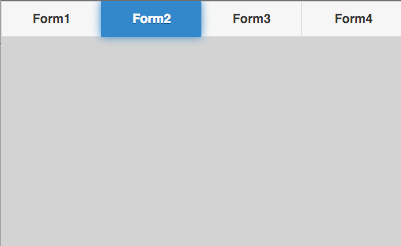
It turns out this is quite easy to do. Continue reading “How to make a control appear on all your forms:”
If your PhoneGap app accesses external websites, there is an important change you need to make to your configxml Project Property.
Make the the following lines are in your configxml:
<gap:plugin name="cordova-plugin-whitelist" source="npm" />

<allow-navigation href="*" />

<access origin="*" />
The change seems to be a result of PhoneGap switching to npm to store its plugins. Be sure to read this blog post for more information on the change.
Edited 05/18/2016: Added allow-navigation line. It’s recommended that the href argument be as specific as possible. More information here: https://www.npmjs.com/package/cordova-plugin-whitelist
The PhoneGap team posted the following to their blog yesterday:
iOS 9 is not officially supported yet, and there are some known issues. The Cordova open-source project team is hard at work on Cordova iOS 4.0, which will include iOS 9 support. For loads of helpful Cordova iOS news, keep an eye on Shazron’s blog, as well as the Apache Cordova blog.
Some of the problems notes by users on the PhoneGap Build Support forum are:
In the meantime, PhoneGap advises using the latest version (if you don’t specify “phonegap-version” configxml, the latest version will always be used) and to use the npm plugins (see this blog post!)
PhoneGap Build is changing how they organize their plugins. You will need to make some changes to configxml in Project Properties as a result.
For each PhoneGap plugin you use, you need to add a line to configxml which declares the name of the plugin. PhoneGap Build can then add it to your app. These used to be saved in a folder on PhoneGap’s servers: they are now stored in an npm repository.
Continue reading “PhoneGap Build: npm plugins”
The easiest way to add a script or an image to your project is to drag it into the Project Explorer. It will then be included in your project and added to the manifest automatically. When you deploy your app, it will be included.
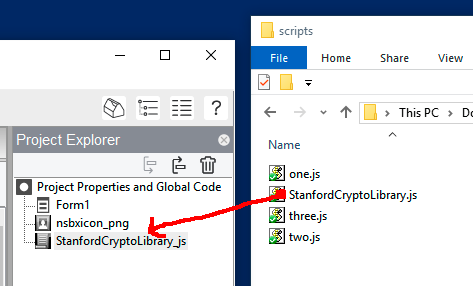
But what if you have a lot of scripts or images?
Continue reading “Including multiple scripts or images with your app”
There are two ways to handle users rotating their devices: prevent them from do so by using the orientation control or locking the screen, or make your app look good in both Portrait and Landscape.
One of the problems with making your app look good in both orientations was doing the layout for both in the Design Screen. AppStudio 5.1 solves that. Here’s how:
Continue reading “Design Screen Now Features Rotation”
We’re pleased to announce AppStudio 5.1 is ready. Some of the major new features are:
It has too many minor improvements and fixes to list here. You can see the entire listing in the Wiki.
Download the latest version from ‘Check for Updates’ under then AppStudio Help menu. It is a free upgrade for AppStudio 5.0 users.
AppStudio 5.0.16 is now available. It includes a number of fixes and enhancements.
Tip: It’s worthwhile to uninstall the previous version. If you’re on Windows, delete c:\Program Files\NSB AppStudio to get a completely clean install.